All your digital media goodness.
Jul 7 2006
As you probably suspect, I’ve been somewhat ambivalent of TiVo’s expanded/additional in-DVR advertising initiatives. While I support their desire to increase revenue and reach profitability, as a paying subscriber I am leery of ads negatively impacting my DVR experience. Additionally, I have (unfounded?) fears that easy advertising dollars could discourage TiVo from pursuing my VOD/PPV (higher development and infrastructure costs, lower profit margins) dreams.
The bottom line is that these types of advertising are just beginning their set-top box intrusions… and are most likely here to stay if the studios can’t prevent fast forwarding through commercials. For example, in addition to TiVo, satellite and cable operators have started rolling out similar “features.” In fact, TiVo’s “interactive advertising platform” was cited in partnering with Comcast. One shady individual (a competitor? consulting firm?) even offered me several hundred dollars to film and describe all of TiVo’s current ad technologies (I declined).
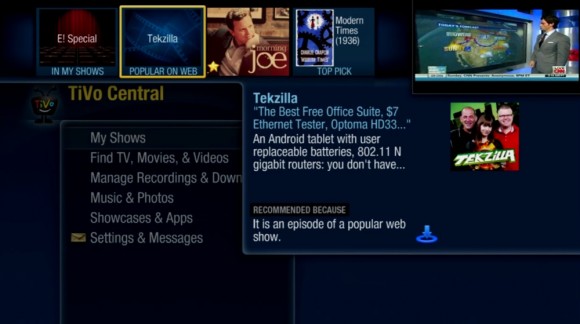
Do I want ads? No… in fact, ad-avoidance is a primary reason I use TiVo. But if we go on the assumption that this sort of advertising is inevitable, how would I rate TiVo’s performance? So far, I think they’ve done a decent job walking the tight rope of pushing ads without alienating customers. The Photos & More section is a cluttered mess, but the rest of the UI is relatively organized and advertising is easily avoided by those who’d rather skip it. That, of course, defeats the purpose… so I call on the advertisers to give me a good reason to tune in — make something compelling, unique, entertaining, etc. As I’ve mentioned before, I’m also willing to sell my time to TiVo and their advertisers at the rate of 25 cents off my bill for each minute of advertising I consume. By the way, TiVo: the one form of advertising I will watch ’til the cows come home is movie trailers and behind the scenes stuff… throw as much of it as you want my way.
Last but not least, kudos to Michelle Quinn of The Mercury News who may be the first reporter to accurately portray my feelings on a subject.
The Mercury News says: When TiVo announced some of its advertising initiatives, Dave Zatz, who writes a TiVo blog called Zatznotfunny, predicted dark days ahead. But so far, the 34-year-old network engineer from Maryland has been pleasantly surprised. “I’d rather have less advertising,” said Zatz. “But if we have to have it, I’d like to see advertisers get more creative and trade us for our time.”
Jul 6 2006
Never enough time… back in America!
Jun 30 2006

I no longer ride the subway to work, so now my commute is far less interesting and far less productive. However, I still have a fond place in my heart for portable multimedia. The two media apps I find myself using most frequently (which can’t be accessed on a subway) are the portable Slingbox player (it does go full screen) and MiniXM (as shown above on my Sprint 6700). I’m obviously on XM, but Sirius subscribers can stream stations via SiriuCE. TiVoToGo converted shows are played back via the included Windows Media Player and ripped DVDs through TCPMP. Orb could stream my home music collection, video, pictures, and television if I wanted — the TV component isn’t nearly as slick as Sling’s box and custom app, but it is free if you have a PC with tuner card. Down the road, I’d really like to see Windows Mobile support PMP services such as Vongo’s all-you-can-eat movie rentals.
Get a new 80 hour Series 2 for free after rebates! If you already have service, a second unit runs only $6.95/mo. I think it’s safe to say this model is heading out… not surprising given digital tuner regulation going into effect next year.

Todd Perlmutter responded to my request for a custom GUI and has delivered the TiVo Converter Wrapper. TCW allows you to choose an encoding profile and queue up .tivo shows for conversion. Unlike TiVo Desktop, you can transcode multiple shows on demand and irrespective of folder location (and without mucking around in XML and the command prompt). Also unlike the TiVo Desktop, you can efficiently choose and run different profiles as needed — useful if you have multiple devices.
Great work, Todd! Now get started on adding settings for custom resolutions. ![]()
Jun 26 2006
Never enough time…
Jun 26 2006

By default, the new TiVo Desktop software transcodes recordings to 320×240 for portable devices. According to TiVo VP Jim Denney this decision was made to limit potential piracy. However, there may be times when you’d prefer something a bit larger. For example the PSP (480×272), various PMCs (up to 640×480), various PDAs (up to 640×480), and (hopefully) future video-capable iPods all support higher resolutions. Additionally, if you’re interested in manipulating these files on a Mac with iMovie/iDVD why cripple your content? (For best results, do not transcode to a higher resolution than your source material.)
Step 1. Open up C:\Program Files\TiVo\Desktop\Support\encodeprofiles.xml in Notepad and study the various tivotrans:Profile name entries (in quotes) to determine which method you’ll be using for your device. You can confirm your selection in the My TiVo Recordings for Portables subfolder. Within the relevant profile, edit the hrez and vrez variables to the desired dimensions. Before going down this path, it would be prudent to make a backup copy of encodeprofiles.xml.
Step 2. Use TiVo Desktop as you normally would and/or… To transcode immediately open a command window to C:\Program Files\TiVo\Desktop, type this, and hit enter: TiVoConverter.exe /profile=”xxxxxx” “C:\yyyyyy\zzzzzz.tivo” Substitute xxxxxx with what you researched above, yyyyyy with the TiVo Recordings directory path, and yyyyyy.tivo with the show you want to transcode.
Step 3. There is no Step 3. (more…)