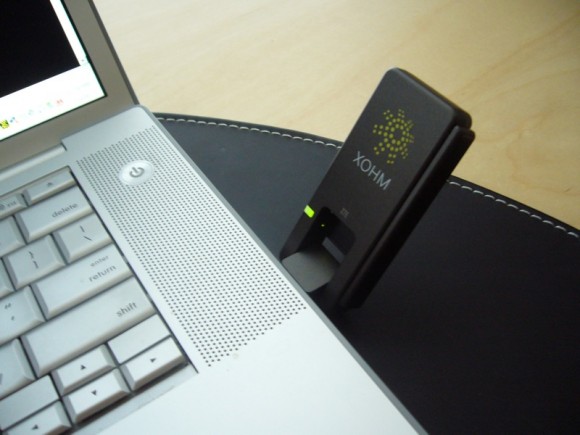
After attending the Baltimore Xohm launch event last month, I decided to roll the dice… And although Sprint’s Xohm WiMax 4G service hasn’t officially launched in the DC metro area, I can confirm that not only are the antennas up, but that they’re open for business.
Over the weekend I trekked up to a Baltimore suburb and came away with a ZTE USB adapter ($60). Promotional service pricing is in effect, so a mobile Xohm data plan currently runs only $30/month. Normal pricing will run $45/mo (after 6 months) which still compares favorably to the $60 wireless carriers typically charge for 3G access. Plus, there’s no Xohm service contracts to mess with.
Because Mac OS X is my primary platform these days, I was somewhat concerned that OS X drivers haven’t been released yet. However, as it turns out, anyone can register at developer.xohm.com. Which is where I discovered ExpressCard drivers have already been provided and USB drivers seem to be only a few weeks away. (Screenshot of the Mac Xohm Connection Manager below.) In the interim, I’m running the Windows Connection Manager within an XP virtual machine.
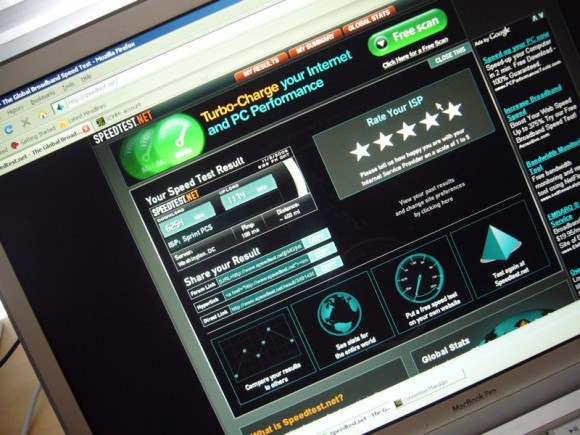
In terms of performance, it’s good to be the only one on the network. My speeds are phenomenal (see below), clearly much higher than the AT&T HSDPA data card which I’ll be shipping back to Dash shortly. Streaming Netflix was no problem. If I had to complain, I suppose I’d mention the card is fairly plain looking and runs super hot. And, of course, unlike existing 3G coverage, the WiMax footprint is geographically limited at the moment. Baltimore, DC, and Chicago are up first. (The Clearwire merger, if approved by the FCC tomorrow, will quickly accelerate Xohm deployment.) Should the team need help prioritizing metros, us geek blogger road warriors frequently find ourselves in NYC and Vegas…
Is there any way I can convice you to pull that ZTE USB adapter apart and take pictures of it’s guts?
I would really like to put it inside a Aigo MID
Also, I can’t find any Ubuntu drivers for the ZTE USB adapter, anyone got a secret source? URL?
No way, dude – I probably don’t have the skills to put it back together and the I haven’t even paid AmEx the $60 yet. Given the heat output, though, I’d be reluctant to embed this specific first gen adapter into anything. I suggest poking around that developer site – ZTE Fedora drivers are in certification and Ubuntu is listed as ‘future’.
“…Given the heat output, though, I’d be reluctant to embed this specific first gen adapter into anything…”
That’s OK, it gets cold waiting for public transportation, I could use a portable space heater!
What speeds are you getting?
—WiMAXED.com
I’m also using XOHM in DC, but with an ExpressCard. I’m seeing similar speeds, although it was really poor at 5th & I the other day. Might just have been that location.
wimaxed, the speeds have varied. In the screengrab above I was getting 6000+Kbps down and 1000+Kbps up. Anything over 1500/500 is a win for me, and it’s consistently above that.
> us geek blogger road warriors frequently find ourselves in NYC and Vegas…
Vegas? Frequently? I assume you’re referring to CES, but are there other reasons for geek blogger road warriors to go to Vegas? I’d think the Bay Area would be a much greater market than Lost Wages.
Dave,
Are you just getting signal in town or is there overlap into the suburbs?
Oliver, there’s all sorts of industry events in Vegas. CES is obviously the biggest, but there are quite a few others. CTIA has moved their spring show there for example. Last year, I think was in Vegas maybe half a dozen times. Regarding, the Bay Area – Clearwire is already broadcasting in Stockton and once (if) the deal goes through I assume the Bay Area Sprint cell towers would quickly find themselves modified to also support WiMax.
Lokisince89, my results are from Rockville, MD. I assume similar or better coverage in NoVa, given Sprint’s offices.
Wow, speeds are very nice. Now, they just need to hurry up and hook Houston up! Please, Sprint, pretty please! :)
@Lokisince89–I’m using XOHM in Gallery Place and Mount Vernon Square in DC so far.
XOHM Service is available at Arundel Mill Mall in Food Court.. GeoffreyM got it there.. Didn’t ya…
Dave,
First off I never knew you were so close. I spoke with you a few times when you were “Slingin” and have been reading your stuff for years. Come find out your hst a few miles away. Such a small world these days. Im in Bethesda and Im going to make “The Drive” Do you mind telling me where you decided was the closest place to pick the Modem up? Thanks Neighbor
Ron, I just moved up to suburbia. Lived off Willard in Chevy Chase (Friendship Heights) the last few years. :) I picked up the card at a kiosk on the lower level of the Columbia Mall. Which actually isn’t as bad compared to first web results I got – cell phone shops and Best Buys much closer/in to B’more.
Anyone try this near the Mall/Federal Triangle?
Dave,
Great review. You mentioned the card was “super hot” and was wondering what you meant – “hot” like it would burn you, “hot” like other cards or “hot” unlike other cards but not enough to harm you?
Thanks,
Carl
Carl, it feels very warm to the touch. Hotter than any other wireless card I’ve used. In terms of practical usage, this probably means nothing. But it was something different.
XOMH1, ease up the sales pitch. We hear ya on having cards at Arundel Mills. And I know you guys are working on commission…
Thanks Dave. And just curious – was it all the time or just sometimes?
$45 is a good price point. $30 is better though :)
At $45 and those speeds, it could be a full-time internet connection. Any word on a download cap?
Carl, Every time I touched it… not sure if that’s all the time or not.
Kevin, I think there’s a cap in the fine print. But at the Xohm launch event, Sprint said they had to include it for legal reasons but they’d match bandwidth to demand as they build out the network. I assume massive P2P downloaders might be shut down, but “normal” use won’t be impeded. As an aside, I’ve had wireless cards (and phone plans) on Verizon, Sprint, T-Mo, and AT&T – not a one has ever gotten in touch with me regarding my usage. So I suspect they only enforce caps when folks are truly out of control. And you strike me as a reasonable fellow. ;)
Dave
Where are you in Rockville? I’d like to switch over, but need coverage in Rockville, Bethesda, New Carolton, …
Steve, close to Gaithersburg actually – 28 and Shady Grove, near 270. At the Baltimore event, it sounded like hundreds of WiMax antennas were already up here and more were coming prior to the ‘official’ launch. Also, the hardware has a 30 day money back guarantee if it doesn’t work out – you’d only pay for however many days of service you used (~$1/day).
Very cool. 28 and Shady…Fallsgrove perhaps…
If sounds worth the trial.
It’s not about commission my friend.. I wouldn’t be doing this if I didn’t love it.. Yeah baby!!! 15 years of Telco.. Do not be afraid of salespeople as long as they know what they are selling…
I would recommend the Exp card as the FCC had held back the USB a few weeks because they thought it was getting too hot… You can it exchange also in first 30 days.. There is no cap on service and nothing said on cap in fine print…
The Xohm acceptable use policy leaves room for caps or throttling. I don’t anticipate hitting a ceiling, but language of this sort is always found in the fine print:
http://www.xohm.com/en_US/xohm-policies/acceptable-use.html#aup_2b
XOHM may provide various Service plans with different characteristics, including different speeds and usage limitations. You agree to comply with these limitations. In addition, your use of the Service may not result in an excessive burden of system or network resources, may not weaken network performance, and may not restrict, inhibit, interfere with, or degrade any other user’s use of the Service. To ensure a high-quality experience for its entire subscriber base, XOHM may use various tools and techniques designed to limit the bandwidth available for certain bandwidth intensive applications or protocols, such as file sharing.
I have read that part many a time and showed customers because they want to be sure.. Bottom line no where in there does it have a cap of sort.. But you can take it as you want.. Bottom-line nothing to worry about..
XOHM1 – the FCC has not expressed any concerns re: the USB and heat. Your statement above is inaccurate.
Dave (or anyone else) I am very interested if anyone has ventured anywhere north of Dave’s 270 and Shady Grove Rd coverage area as of yet. I have a Townhouse on Clopper Rd at Mateny (By Grand Mart aka Old Weis Market) and I am very curious as to whether I will be able to squeak by as of yet. If so it will be a life saver as I will be able to Sling and have Internet without re-hooking up COMCAST.
Of course I will probably go out to Elkridge Best Buy (25.7 Miles from my Bethesda Location) today anyway because that’s how us Geeks are, but I thought I’d see if anyone could light a fire under the driver’s seat!!
If any other Wash DC area/ Suburban MD area residents are going to be tempted by Dave’s results, I called yesterday to XOHM and they will ship to you (even if you are not in the coverage area), UPS Ground at No Charge and UPS Overnite at $10.00. In hindsight I should have done overnite and would have saved the $10 in gas anyway, but thats why they call it hindsight. BTW, the cutoff for shipments from XOHM is 5PM EST.
One other question I had asked was would it be possible to switch back and forth between 2 devices (like an ESN or IMEI change) I seemed to have caught him by surprise, but after a few just a seconds” my end result was a definitive “No one really knows but I doubt it” So my thought of buying the PC Card and USB both is on hold for now. But if they let you buy the cards and then take them home and activate, the idea sure sounds good, best of both worlds.
No luck with Xohm near Federal Triangle metro
Dave-
you might want this widget to keep track of XOHM Developer news: http://developer.xohm.com/widgets/badge/
Just picked up my USB Modem from the Elkridge Best Buy (two employees located in the Mobile / Notebook area had NO IDEA what XOHM or WIMAX was and had to go find a Manager to lead me to the display. Fairly surprising. )
Well I get it home and no that I am sharing the Upper Montgomery County network with Dave, gots to say “How Sweet It Is!” My average so far is 7800 dn and 1280 up. This from my Bethesda location within 1/2 mile of Old Georgetown and 495 overpass. Cannot wait to get up to Germantown. Dave, thanks for starting this up with your motivation to start out upcounty. You will be remembered as a pioneer my friend!!! ( “Yeah Sonny, I remember back when Ol Dave Zatz first discovered this here WiMAX network up county!! Wow really Grandpa?!!” )
Some more info. I have now been informed we can switch between device MAC addresses all we want and have the ability to do it online ourselves without Customer Service being involved. So if you want to have a PC Card and USB shared between 1 account, no problem. I was very specific in my questioning and received competent and direct answers. This rep was on the ball.
Also, you can change to the 2 for Life service plan later on if you so choose. My point was I may want to get a second device for a family member, will there be a hassle to convert my existing unit to a 2 for Life. No issue at all.
Little bit of coverage information in Upper Montgomery County , MD
I was able to get coverage all the way up North Bound 270 into Montgomery Village Ave exit. I then jumped off 270 and took Clopper Rd towards Mateny Dr. I lost signal about 1.5 miles up Clopper Rd. I did not regain coverage until I pulled over and sat still on Mateny Dr off Clopper by the 7-11 store. After about 3-4 minutes I was able to regain Signal and connect to my Slingbox. Unfortunately the bad news for me is that I pulled into my Townhouse subdivision off Mateny Dr and lost signal again as I was entering. I then took my Laptop into my Townhouse and spent about 20 Minutes attempting to regain a connection, upstairs, downstairs, every room in the townhouse. I was unable to at this time. Once again, we are not officially launched in the DC Area so who knows what an offical launch will bring.
So if you live in Upper Montgomery County. I would not think, at this time, you will have very solid coverage North of Quince Orchard Blvd. I also went over to Montgomery Village Ave and drove around into Montgomery Village, off Rt 355. I was unable to regain coverage at any time.
While certainly not a scientific survey, being that this is the northern most point of the new XOHM WiMAX System for DC, it gives you a ballpark idea of what you are looking at ( Up Montg Co.) prior to launch, sometime this Month.
I will keep you posted as my travel with WiMAX continue!
Well Ron that’s what you get for living up in the sticks ;) If I can get connectivity between Rockville (work) and NW DC (home) I will be over the moon!
Will there be coverage to Woddbridge, VA for WiMAX? Thanks!
Meant Woodbridge, VA! Sorry!
AEnde, you should be getting thjose Moonwalkers out because basically you should be fine. I have used all over Rockville and I certainly do not see DC being an issue ( of course a Non officially launched system is bound to have holes etc)
As to Woodbridge VA, I have no idea. That is fairly out there. No one that I have seen blogging / posting has seen any form of coverage Map, proposed or actual to date. That what I am very anxious to see.
Just a question for the experts: Is Xohm available for Macs (without resorting to virtual Windows)? I use an Imac at home and a Windows XP laptop. Will I be able to use one USB gadget on one account for both, or will I need two gadgets to use with one account, or will I need two separate accounts?
Tom, there are currently Mac drivers for the ExpressCard and USB drivers are expected in the near future. You can use a laptop card with as many computers as you want. You could also pick up a Xohm modem to connect your home and no drivers would be needed once setup is complete.
I just bought the Xohm modem, I am in Arlington, VA. Everything works great!!!!! I am very pleased. Speeds average 4000-5000 Kbps down and 1000Kbps up.
Ron, thanks so much for the info. I think that pretty much seals the deal for me. Wimax here I come!
Hi Dave, thanks for sharing. I use your post for my blog.http://www.wimaxian.com/2008/11/16/zatz-caught-xohm-wimax-in-dc/
btw where did you get XOHM USB driver for your macbook pro ?
WiMAXian, I run Windows on my Mac when I want Xohm. Hopefully, that’ll be resolved within a few weeks.
The DC Coverage Maps have now been integrated in at the XOHM site. I was able to check coverage for my Townhouse in Germantown MD and it did show coverage, or rather lack of, in that area. There was some coverage shown though. I personally would not hold to true to these maps ( for that matter what coverage map can you?), basically it seems they are showing where a Site may be and then the actual “Official” coverage for that site. It shows my parents home in Bethesda as having what appears to be a “WiMAX Island” and no coverage except for the Island, and I can tell you right now Im getting good coverage when Im off my “Island”.
I do not think we will see our “Novemeber Launch” but you never know!
I’, hoping Chicago launches soon which looks like it will since IPCS is out of the way and the merger is complete.. I was using my modem at families house in Philly this weekend.. Getting 3 down and 1.5 up..
I”ve been using Xohm for about three weeks in D.C. near GWU and have generally been pretty satisfied. But in the last couple days responses have been very slow, and there have been times when I have gotten time-outs even though the device shows that I am connected. Anything weird going on?
An update… I’ve temporarily canceled my Xohm service. Too many of my computers are Macs and it sounds like OS X drivers for my particular USB card are still a ways off. Plus, it’s been confirmed there won’t be any WiMax outside of the Clear/Xohm booth in Vegas for CES.
Any updates on the service in Washington DC area? Is it still up and running? Last couple of posts stated that the service was having down times.
Is this a 3G or 4G service. I read the following in PC Mag.
“WiMAX proponents like to call the network “4G” or fourth-generation cellular wireless, to suggest that it’s faster or more advanced than the 3G cellular networks out there right now. But the ITU, the trade group that designs these things, calls WiMAX 3G along with the existing networks. Ironically, this was supposed to be a victory for WiMAX – ITU approval typically makes a technology more popular worldwide. But it puts Sprint in an uncomfortable place marketing wise, as they now need to explain that this 3G is better and faster than their other 3G.
What’s happened to XOHM in D.C.? I signed up with XOHM in November and had a good signal without interruption until Jan. 20. Then service stopped and didn’t resume for a week. The signal stopped again on Feb. 6 and hasn’t come back yet. Customer service has told me that since the system hasn’t officially launched yet in D.C., they are providing no customer support — in other words, tough luck. I even tried to send an email complaint to the company, and got back a response from customer service telling me what they had already told me on the phone. A sales rep told me that the official launch date was going to be March 1, but that’s been pushed back to an unknown date for unknown reasons. The D.C. regional sales manager apparently just left the company. What gives in D.C.?
I picked up a really week signal past Dulles today at a Starbucks. But who knows what the official status is and which company Clear/Xohm/Sprint will “launch” here.
i had been using xohm just fine up until last week here in College Park but since last week my speeds have been real slow. i created a service ticker with xohm but no response so far
works fine for the last couple of weeks at m st 17th, near farragut north metro…
also works in fairfax county :-)
Hey Guys,
Have you noticed that XOHM Wimax in Rockville is no longer working. I’ve been trying since yesterday and there’s no connections available. too bad this was working so well here in Rockville :(
Anybody have any new word on what’s happening with XOHM in D.C.? It was supposed to launch at the beginning of this year, but that’s been postponed and I understand the Washington-area test signals have been switched off. Any news?
I would love to know if anyone has seen the system come back to life in the DC Market as of yet. My main concern is Gaithersburg / Germantown MD. If anyone could whip out there USB / OC Card or Desk Modem and check for Signal Id be appreciative. I know that around the end of May it was off, but I figured with a “Tentative” 2010 launch discussed for DC “again” they have to bring the system back up relatively soon.
I have moved back to my Townhouse in Germantown from Moms in Bethesda and hate to have to startup a COMCAST acct again just for Internet. I am using Tmobile for my DATA and doing quite well with my Slingbox’s and Moms Cable with a bit of VuDu and Hulu (Nice Rhyme) on the side. WIMAX would make it perfect.
I’m in Columbia Heights, at 13th at Harvard Sts NW, and have had a continuous signal since I signed on with Xohm last November. I’m moving to Petworth soon and confirmed there’s a signal there, too, near the Petworth metro stop. I’ve also gotten a signal in Adams Morgan, downtown (15th and L) and Dupont Circle recently. So the towers are still working in the middle of DC.
An update here: despite others’ apparent success nearby, there is still no signal in D.C. around GWU. I had a strong signal from November to February, nothing since. Anybody have any new information about the official D.C. launch?
Everything I’ve seen recently indicates a 2010 launch. Kinda sad considering it was unofficially active since 2008.
I has been working at LOGAN Circle area since last year…until about 3-4 days ago…can’t pick up signal anymore. Anyone has more information ?
Anybody have any new word on when/if XOHM is coming to D.C.?
4G WiMiax services will be marketed under the Clear brand and also provided via Sprint. I’m told it’s happening this year. The fact that Overdrives are for sale here might suggest it’s coming sooner rather than later.
Is Xohm/Clear still up and running in Baltimore? It seems to have dropped off the Clear coverage map. And DC isn’t even among the cities listed as “coming soon.”
Clear is opening a store in Dupont Circle. I rode past it today. The store looks completely set up and ready to open. The Sprint store in Dupont said that the official launch date for Washington DC Wimax is September 4.
Could someone say where that Dupont Circle Clear store might be? I might like to drop by, but it doesn’t seem to come up on the Clear web site.
Wonderful goods from you, man. I’ve keep in mind your stuff prior to and
you’re just too magnificent. I really like what you’ve obtained right
here, certainly like what you’re saying and the way through which
you are saying it. You are making it enjoyable and you continue to care for to keep it sensible.
I can’t wait to learn much more from you. That is actually
a tremendous website.