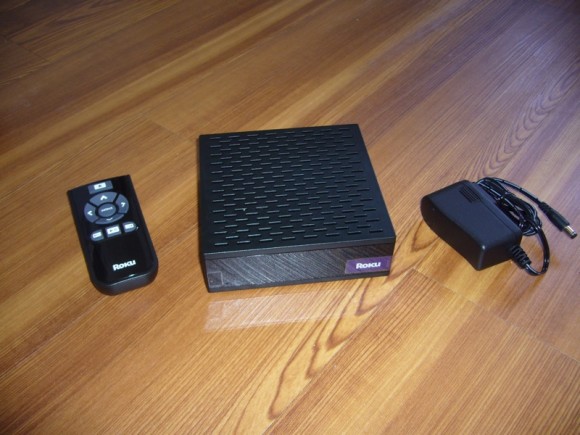
My Roku Netflix Player just arrived, so of course I dropped everything to get it running. Setup and operation are extremely simple, and I appreciate the inclusion of WiFi (like Apple TV, as opposed to Vudu, Xbox, TiVo, and Akimbo). The rewind (and fast forward) thumbnail scanning functionality is going to take some getting used to, plus we’re obviously going to need more content and in higher definition. For the time being this won’t replace anyone’s DVD player, but the Netflix Player is reasonably priced with brand awareness and I’m a fan of an all-you-can-eat video subscription – we’re headed in the right direction. I’ll have additional thoughts after spending more than 10 minutes with it… and we’ll add Roku to the brewing Battle Royale.
HA! I just watched Strange Brew yesterday!!
Slightly off-topic: I actually just moved off of the wireless in my entertainment center and ran gigabit to it. Even bought the wired adapter for the Wii.
On-topic: At $99, this might convince me to finally give Netflix a shot… though I would prefer to see this functionality in my TiVos.
Gosh, I do NOT want video transferred via wifi. I live in a condo with dozens of wifi/routers around me. When I tried to subsist on wifi to my TiVo, PS3 and Xbox 360 it was a hellish experience. Since moving to Linksys Powerline AV Ethernet Adapter solution, pushing heavy traffic around my home became a breeze. I HIGHLY recommend it.
Wish Roku worked in Canada. Hey Dave, want to send your Roku up to me for a week. I’ll test it and send it back. I’d love to see if it will work up here or if the do IP blocking to thwart it. If it worked, I would purchase one and set up a dummy U.S. address to use with my U.S. credit card.
…Dale
I’ve got 10 visible networks in my apartment at the moment and my throughput is enough to stream Vudu in HD (via ASUS wireless bridge) or have max bars in Xbox Live, with WPA on. Hard wired is preferable, but until WiFi no longer handles it I’m not running cables. At the old place, I used more Powerline (Sling) gear but haven’t unpacked it here yet.
Dale, I’m off to Wisconsin, then Chicago, then California. Remind me the second or third week of June and I’ll send this up to you to check out.
That would be cool Dave … not sure if your ‘running cables’ point was directed to my comment or not, but the Linksys powerline solution I’m talking about doesn’t require stringing any wires – that’s the point. You just plug them into the nearest power outlet (one behind your TV and the other behind your router). That’s it. It’s simple and just works. But, whatever you do, DO NOT use the D-Link powerline product. They really suck! I’ve witnessed 3 of them burn out within weeks of installation.
Cheers.
…Dale
I just googled and answer the question I was about to ask…
it has support for 802.11b/g with WEP, WPA, and WPA2
Works with wep,wpa, and wpa2. Easy setup with either wired or wireless. Wireless is a Big Plus. Only downside is if your TV is far from router. At 99 this is a steal. I run HDMI into a HDMI auto switch. I dont think there is a power on the remote so this is an issue with my auto switch I have to think about. Quality is surprizing good on my 42in plasma. Selection at Netflix is limited but its free with my Netflix subscript. Overall this is a winner for Roku and Netflix.
Try the Actiontec MegaPlug 200 mbps AV Powerline Ethernet Adapters. Works great for STB, Media Players, Xbox, PS3, Wii, Sling, etc. Check out Buy.com they usually have great deals on Actiontec gear.
http://www.buy.com/prod/actiontec-megaplug-200mbps-powerline-homeplug-adapter-kit-hle200av0-01k/q/loc/101/204647344.html
Well Personally i would not use Wifi of any kind for video streaming! I got my NF box and hooked it up to my WIRED network W/ Comcast basic 4mb service and it works at near max resolution! but when i tried it with a G router it stumbled and video quality SUCKED!
Love the Box though!
These boxes are now 5 weeks back ordered!
Opps. Scratch that. Even though they said five weeks, it shipped today. I guess the sped up the supply chain.
I got mine last weekend, and I love it. I use wireless, and it works great. I could run ethernet to the box, but I haven’t needed to do so. There’s some varying quality of content, but the box does a great job. It is tucked away discreetly beside the VCR, so it doesn’t waste space. Netflix gained a new customer because of this box.
I’m eager to find out whether the Canadian experiment worked. If it does, that’s one more step away from cable TV.
Despite cable modem, quality isnt that great wireless. Would I get better quality if I used ethernet cable instead?
Any word yet regarding getting this thing to work in Canada? If so, I would jump on it in a second. :) Just have to set up a PO Box near a border crossing.
Yeah, I would love to know if it’ll work in Canada or if they’re using some type of IP origination in the code that stops it from working.
Something tells me a hack/fix would be quite around the corner if that’s the case.
The majority of reviews I read of the Roku was how great this product is, and how easy it is to install. I am having problems. I live in a 2 level condo with my internet modem and 2 computers downstairs (office room) and my big tv upstairs (connected to cable). I want to install the Roku upstairs (living room), but it’s one hella of a job trying to run wires in the walls.
Alternatively, I buy a router and split the line up, and run a long 35 feet cable upstairs, but that would look really ugly.
Any suggestions or ideas? I guess the easiest would be wireless. But how about the quality?
I’m running WiFi with a Belkin “Pre-N” router that supports 802.11/b and 802.11g, which potentially could support 54Mbs. Although 802.11/n? (pre-N I haven’t read up on) might support greater, it seems to grab the WiFi fine although I only get “1” or “2” quality, the former being far worse than VHS, but “2” being DVD quality on my 11 year old TV. Obviously my 1.5Mbs DSL service is the bottleneck. I haven’t found out how much memory/disk(?) this box has, but it buffers OK – still, I think it’d be nice if there was enough storage for an entire movie/TV show and it would buffer the first five minutes and keep storing while I watch. Given the GPL source code and plans to support HD with this box I’m hoping those of us who don’t care about HD will be able to get true Rewind/Fast-Forward without long pauses. Overall, for the price ($113 with shipping) it’s still worth it given how Netflix slows down delivery if you return disks too quickly – at least I’m not stuck in bed (due to medical problems) for 1-3 days without something to watch other than crappy network TV.
teenwah – as long as you get good quality or above it should be ok .. the bottleneck is your DSL or Cable. I know at 1.5mbps sucks, 3.0mbps+ is 3-star, 6mbps+ is 4-star
1) try wireless booster
2) try homeplug adapters (lan-over-powerline) and if that doesn’t work
3) try MOCA (multimedia over Coax) if you’re a VZ customer ..
4) http://www.soundandvisionmag.com/tutorial/1672/step-by-step-how-to-run-wire-through-a-wall.html
As an American living and working in Canada, I would LOVE to see if the Roku box will work up here. My brother wanted to get it for me for Christmas and I thought I would do some research to see if I could get it to work. Anybody find anything out about a hack or a way to get it working up here???
Clint
Please email me if you know anything!
clintmcphee (at) g m a i l (dot) c o m
Bought Roku…have Belkin Wireless G router…cannot connect to internet. Any suggestions would be appreciated.
In my country place, where I am on a 10 acre lot, the Roku box works well. In town, where I have to run an infrastructure based WIFI network due to the amount of other WIFI networks and other associated radio frequency interference. (Of which the Roku box when placed next to a Motorola DCT-700 cable box will give a little feedback from the cable box.) I have two access points running in what’s known as a FIPS-140-2 configuration. It has no problem with the security, it just cannot do the signal strength mathematics, and will not always connect to the strongest access point, of which is a very elementary WIFI concept since the first access points appeared in the late 90’s. Roku told me to put the access points on 2 different SSID’s. I told them that it was unacceptable as I enjoy being able to walk my laptops and any other compliant device all over the house. Infrastructure based WIFI networks work much like cell networks, as you move you switch to the strongest access point. They then told me that infrastructure based WIFI networks were not supported, nor is there any plan to do so any time soon. Furthermore, they have clocking issues. I find the audio and video drift such that the lips may be as much as 1 second off sync. They stated that the software revision 2.3 may address the issue. I see two icons for each access point, but when I select each icon, it still does the math backwards and connects to the WEAKEST access point.
This IS NOT a WIFI compliant device.
Hardwire only.
Unless you want to be a constant help desk for the non-technical savvy, DO NOT give this thing as a gift.
Neat idea. Built early VoD systems 10 years ago for hotels and the cable industry. Roku blew it. Perhaps version 3 of their code will address these immaturities and lack of IEEE compliance.
This is not IEEE 802.11a/b/g/n compliant.
Perhaps bring the device to Neil-Nelson, UNH-IOL and they can help you on your non-compliance issues.
I am so ignorant about set up that I don’t know where to start and the instructions leave me in the dark. I have put in the batteries, plugged in the box and the remote does not seem to do a thing. I have a wireless system. Can anyone help an idiot. This is the second box I have had and sent the first one back before I had wireless and a new TV.
Help! I got the Roku as a Xmas gift, and I bought a Linksys WRT160N wireless router to connect it. I cannot get the Roku to connect to my wireless network. I keep checking the router status, and it looks fine. Can anyone give me a step by step idiot guide that might help?
(I’ve also tried disabling the firewall to no avail.)
Okay. I’d like to try this unit but I don’t have wireless internet. So, I’ll be running an ethernet cable from the unit to my internet connect. I’m just not sure where to plug it in at!!!! Do I just plug it into the back of my computer where there’s an ethernet plug? Or do I need to plug it into the Speedstream unit I have?
Just not sure what to do here?????
So here is the skinny. I tried setting one up with wpa as well. depending on the router it may not work. Your router needs to be able to support wpa2-psk or WPA Personal with TKIP encryption .
Th other option is to use wep that always works. I know it is not secure
xbox 360 use to to have the same problem until a recent update at the end of the year. it did no support wpa2(microsoft your so stupid)
Netflix has a great new Roku box and getting newer movies to rent now for 9 bucks a month the only problem i have with there service is that there commercial makes it sound easy to get it on your TV through the Roku box after ready how hard it seems for people to hook it up i say forget there service if they dont hook it up for you and they wont even give you a free box they expect you to pay the 100 bucks not knowing a thing about how to get it copnnected and working properly while they do nothing to help out anybody.People should just stick to cable or satellitte and order premium channels they install the box it doesnt cost anything then you just order starz or Showtime or cinemax or hbo and it comes right on your tv you dont have the headache of trying to hook up a roku box not knowing if you can get it to work or not and it just ends up sitting there in your room collecting dust and your out of a 100 dollars not worth the problem un less netflix sends people out to get it running and running good and right its not worth it especially if your not and expert.I also heard roku’s customer service is real bad if you have a problem with anything god forbid your box malfunctions.
I tried to hook up the Roku box, but the instructions, including the hyped-up video, are useless. They leave out a lot of stuff, namely, that you will need a router for one thing. Being a non-tech guy, I didn’t know what that was. So I had to go to the store and buy yet another device in order to take advantage of Netflix “instant” movie viewing. After struggling with the router and Roku connections for an hour, and trying to understand the Roku (very nice folks, but impossible to understand) support line people, I gave up, but I will try again — maybe tomorrow. Also, the D-Link people say on the box that they have 24-hour support. Apparently, there 24-hours don’t count on the weekends.
i tryed to watch any movies i want it said i have to pay
and my channel said it is not available so i want to upgrage my roku
I have the problem that Dawn encountered with the WRT160N device. Any luck Dawn?